


Looking for one guide to learn how to launch a Kickstarter this year? Well, you came to the right place.
This Kickstarter course is all of our best guides in one. It covers everything you need to know to launch a successful Kickstarter campaign this year. From positioning your product to creating marketing assets, attracting backers, and managing costs. Think of it as a roadmap from complete beginner to confident campaign creator.
Also, if you’d like to watch instead of read, check out this mega YouTube video I put together here:
Key Takeaways
- Product positioning matters more than you think. The same product can fail or raise six figures based solely on how you position it to your target customer.
- Visual assets are your secret weapon. Good product imagery, campaign videos, and landing pages translate directly into backer trust and campaign momentum.
- Pre-launch marketing drives campaign success. Using Facebook ads to build an email list before launch is the strategy working best for our clients today.
- Budget realistically for success. Plan for $5,000 to $20,000 in total campaign costs, including product development, marketing, and platform fees.
- Kickstarter takes 5% plus payment processing fees. Factor in an additional 3-5% for payment processing on top of Kickstarter’s platform fee.
Lesson 1: Kickstarter Marketing Strategy Overview
Let’s start with an overview of the entire Kickstarter marketing strategy. This will be very high-level, but will give you an idea of how everything works together.
Step 1: Positioning Your Product
Good product positioning convinces your target customer that your product solves their problem. I like to use the consumer-based brand equity (CBBE) framework, which has four levels.
At the base is salience, answering “what are you?” in simple terms your audience understands. Next comes performance (what makes your product special) and imagery (where and how people will use it). Third is judgments (addressing doubts) and feelings (the emotions your product evokes). At the peak is resonance, the connection between your brand and customers that creates loyalty.
Step 2: Capturing Product Imagery
Good visuals translate to instant appeal. You’ll need photorealistic renderings (if your prototype isn’t ready) and three types of product photography: studio shots on clean backgrounds showing every angle, location shots showcasing your product where people would actually use it, and action shots highlighting key benefits through motion or interaction. These images become the foundation for all your marketing materials.
Step 3: Building a Reservation Funnel
A reservation funnel collects email addresses and $1 reservation deposits during pre-launch. People who put down $1 are rewarded with your best launch deal and become VIPs. The data shows that someone who puts down a $1 deposit is 30 times more likely to buy than someone who only gives their email address. Your funnel should include a landing page, an exclusive VIP offer in exchange for the deposit, and a thank you page inviting them to join an exclusive community.
Step 4: Setting Up Your Email Marketing
Before building your pre-launch list, you need the right email strategy. Follow two best practices: limit your calls to action (ideally one per email) and prioritize quality over quantity.
You’ll need two email sequences: a welcome sequence (two emails when someone first signs up) and a launch announcement sequence (two emails in the week before launch). Set up separate welcome sequences for non-VIPs (focused on upgrading to VIP) and VIPs (focused on engagement and community).
Step 5: Driving Traffic With Meta Ads
Facebook and Instagram ads are the best way to drive traffic to your reservation funnel. Start by identifying your superfan. Give them a name, backstory, occupation, and income, then ask what they do for fun, what brands they buy, who they follow, and what they watch. These become your targeting interests on Meta.
For ad imagery, use studio or location shots from your product photography. Test different ads and audiences until you find the lowest cost per $1 reservation, then scale up your budget.
Step 6: Building Your Campaign Page
Your campaign page should be treated less like a novel and more like a direct response advertisement. Think in headlines. Most people skim, so your headlines need to tell the story. Use lots of GIFs to showcase your product in action.
Most importantly, use your pre-launch data to influence your page design. If a headline worked on your landing page, use it on Kickstarter too.
Step 7: Creating Your Campaign Video
Your campaign video is important but shouldn’t break the bank. I think most first-time creators shouldn’t spend more than $15,000, and many can create effective videos for $2,000 to $5,000 with a student or freelancer. Focus on a great script driven by voiceover, shoot in one location with a few actors (who could be you or your friends), and use stock video to keep costs low. You can write your own script and hire contractors for filming and editing.
Step 8: Choosing Rewards & Pricing
Your rewards are the buying options for your campaign, and they need to leverage six key pricing concepts: discounting, price anchoring, scarcity, urgency, the paradox of choice, and value stacking. I recommend three strategies depending on your product: discount stacking (multiple rewards for the same product at different discount levels), the no-brainer deal (bundling a low-cost add-on that makes upgrading obvious), or value stacking (bundling multiple standalone products together). Each strategy uses different limits of time and quantity to incentivize backers to get in early.
Step 9: Setting Your Funding Goal
Setting your funding goal depends on whether you’re using crowdfunding as a funding tool or a marketing tool. If you need to raise funds to create your product, set the goal at whatever amount you need (based on your manufacturer quotes for minimum order quantity). If you already have the funds and Kickstarter is for exposure, set the goal at whatever you believe you can hit on day one. This gets you funded quickly, which increases social proof and attracts press and free traffic from Kickstarter.
Step 10: Choosing Your Launch Date
Data from over 342,000 Kickstarter campaigns shows the best time to launch. Tuesday has both the most launches and highest average number of backers per project because email open rates are highest on Tuesdays. Launch between 7-10 a.m. Eastern Standard Time to take advantage of the entire day in the US (unless your audience is primarily in a different time zone).
Avoid December (the worst month) and November if possible because of holiday spending and Black Friday competition. If you have a seasonal product, launch during the season when people will use it, not when they’ll receive it.
Step 11: Launching (And Getting Funded)
One week before launch, start the hype train with two emails to your pre-launch list: one sent 7 days before launch and one sent the day before.
On launch day, send two emails: one in the morning and one in the evening. This flood of backers will shoot you up in the Kickstarter rankings, bringing more visibility to your campaign. In most cases, you’ll blow past your funding goal in minutes, and in our campaigns, 20-40% of total funding typically comes from Kickstarter itself as free traffic.
Step 12: Driving Traffic With Meta Ads (Part 2)
Once you’re live, you can see exactly how much money you’re making for every dollar you spend on advertising. Start with remarketing to your entire pre-launch email list using the “surround sound strategy.” Be everywhere when you launch so VIPs don’t miss it.
Then attract new people by targeting a lookalike audience of your VIP list and your best performing pre-launch audiences. Use social proof (how overfunded you are), reviews (testimonials or press mentions), and hyperbole (strong adjectives like “insane” or “ultimate”) in your ad copy.
Step 13: Using PR & Influencer Marketing
Most people trust a brand more when it’s recommended by others, even by strangers online. Focus on micro and nano influencers (under 100,000 followers) because they’re easier to reach, have higher engagement, specialize in specific topics, and are more open to commission agreements. Find them by searching YouTube, TikTok, or Instagram for reviews in your product category.
For PR, create a press kit with product photos and videos, then find journalists who covered similar campaigns and reach out via LinkedIn or email.
Step 14: Boosting Your Campaign
Many campaigns experience a “valley of death” in the middle where funding slows down. Avoid this with three tactics: cross promotions (partnering with other live Kickstarter campaigns to promote each other in campaign updates), backer newsletters (companies with backer communities you can promote to on commission), and platform promotions (on Kickstarter, aim for the “Project We Love” badge by creating something innovative with an aesthetically pleasing campaign page).
Step 15: Finishing Your Campaign Strong
Sprint through the finish line with focused email marketing and Meta advertising. Send three emails: one 3 days before you end and two on your final day (morning and evening).
For Meta ads, start remarketing again to your entire email list and everyone who visited your Kickstarter page but didn’t buy. Update your messaging to lean heavily into urgency since the campaign is ending soon. Use phrases like “ending soon” and “last chance.”
Step 16: Setting Up Late Pledges
Turn on Kickstarter late pledges before your campaign ends (you can’t add them afterward) to continue making sales while you manufacture your product. Announce late pledges in a campaign update, make your late pledge rewards a slightly worse deal than your live campaign (to reward early backers), and don’t set up multiple stores. Treat late pledges as your one pre-order store. Unlike your live campaign where backers are charged when the campaign ends, late pledges charge credit cards immediately, giving you steady cash flow during manufacturing.
Step 17: Using a Pledge Manager
A pledge manager lets you collect critical information from backers after your campaign ends, like shipping addresses and product variants (size, color, etc.). You have two options: Kickstarter’s native pledge manager (a fully featured pledge manager that rivals Indiegogo’s) or third-party pledge managers like pledgemanager.com.
Use your pledge manager to sell more products through upsells, charge for shipping after the campaign (to ensure accurate rates based on validated addresses), and charge taxes based on location. A good pledge manager makes this easy.
Lesson 2: Product Imagery
If a picture is worth a thousand words, then a good product image is worth a thousand backers. Good visuals translate to instant appeal. And there are two main types of product imagery you can use to get there: photorealistic renderings and photography.
Photorealistic Renderings
These are like the magic of Photoshop for your product. Renderings allow for precise control over product appearance, materials, lighting, and environment. And these can be a lifesaver if your prototype isn’t ready yet. All you have to do is find a 3D render artist on a site like Upwork, and you can start your marketing while finalizing your physical prototype.
An important note though: photorealistic renderings are not allowed for hardware and product design projects on Kickstarter, but they can still be very useful in your marketing during the pre-launch.
Product Photography
Next, we’re talking about the real deal. Product photography. You want to get three types of product photos: studio photos, location photos, and action photos of your product.
Studio Photos
Studio photos are like the glamour shots of your product. Throw your product on a white or colored backdrop and highlight every angle and feature.
Location Photos
For location photos, you want to showcase your product where people would use it. So if you have a camping product, get it out in nature. If it’s a desk accessory, shoot it on a desk. These location photos help potential backers visualize themselves using your product in real life.
Action Photos
Action photos show your product being used. These are powerful because they demonstrate functionality while creating an emotional connection. You want to capture real people interacting with your product in authentic ways.
The key to great product imagery is variety. Mix studio shots with location and action photos to tell a complete story about your product.
Lesson 3: Kickstarter Pre-Launch Landing Page
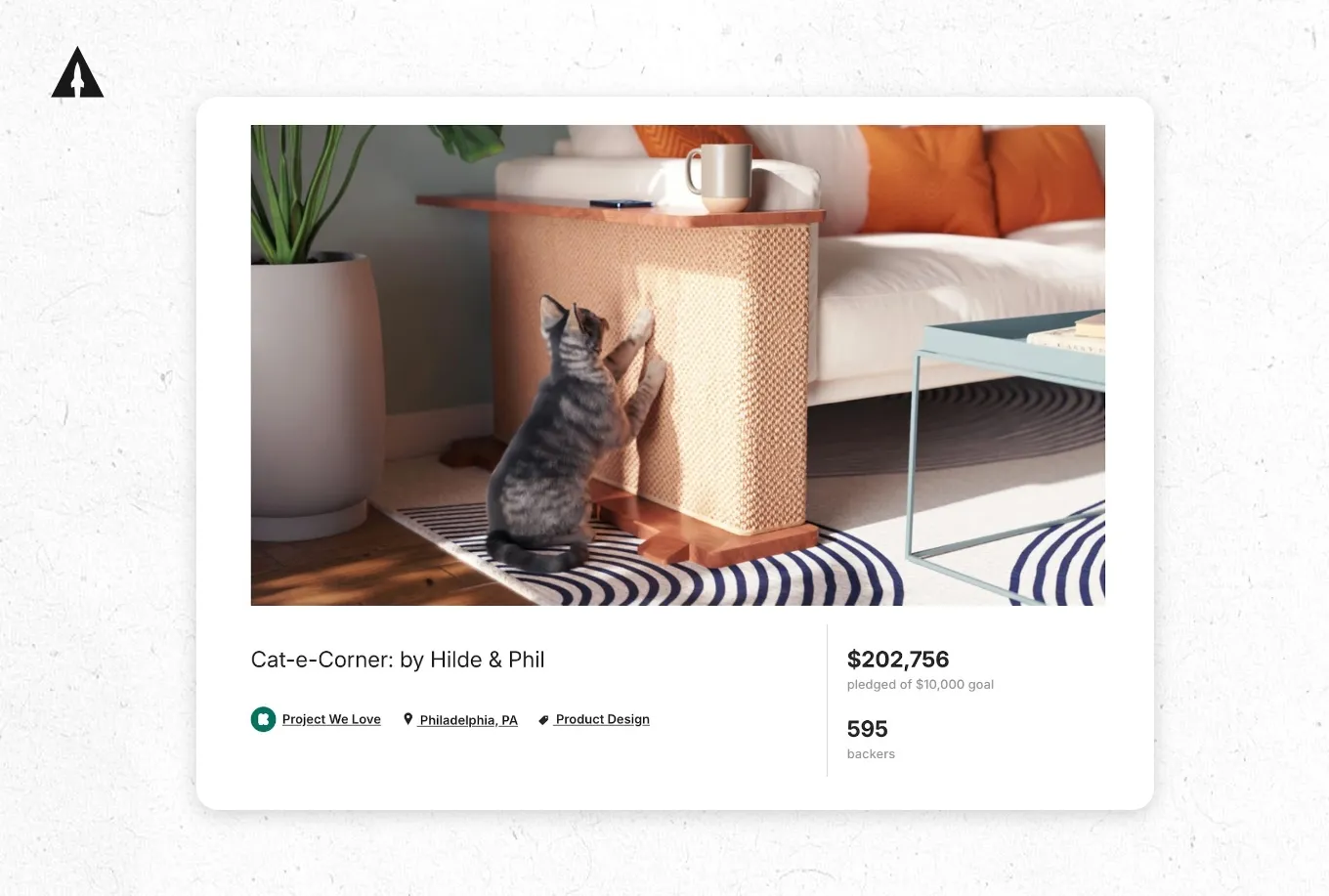
A pre-launch landing page is a website that has more information about your project and only has one goal. In the case of your pre-launch on Kickstarter, that goal will be to collect email addresses of people interested in your launch. I’m going to show you how our pre-launch landing page template helped Jeremy from Cat-e-Corner raise $202,756 on Kickstarter.
Step 1: Create an Outline
The backbone of a good landing page is well-written content. And the first step to writing great content is to create an outline. Bolded lists work great here. So don’t worry about making things sound really good because we’ll get to that later. For example, here’s what the outline for Cat-e-Corner’s landing page looked like.
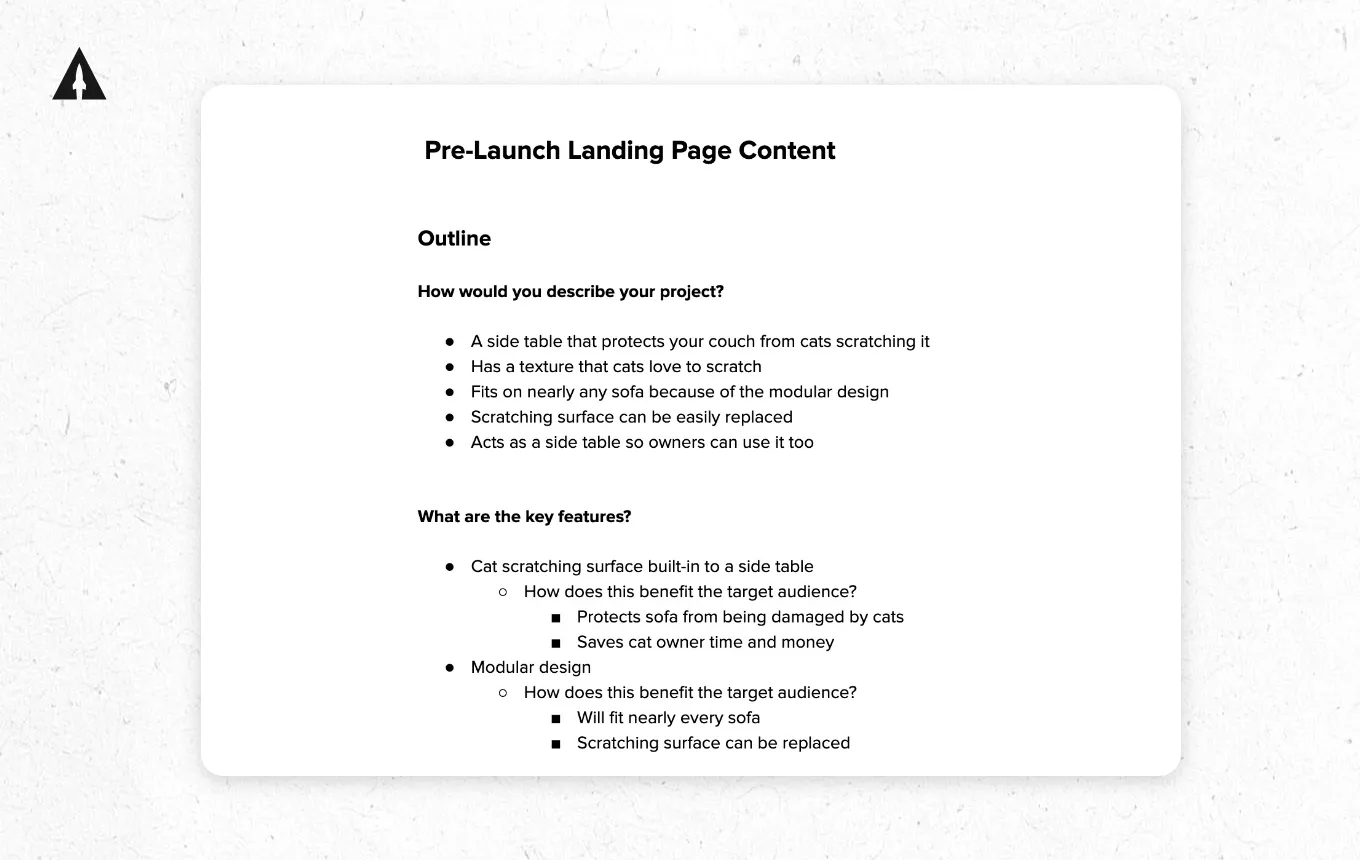
It’s good to pose some questions because it makes writing the outline faster and easier.
We first posed the question: how would you describe your product? And that led us to quickly write out basic things like “a side table that protects your couch from cats scratching it and fits on nearly any sofa because of the modular design.”
Then we posed the question: what are the key features? For the first key feature, “cat scratching surface built into a side table,” we further broke that down by asking: how does this benefit the target audience? You can see two bullets listed out here: protects sofa from being damaged by cats and saves cat owner time and money. Outlining the answers to these questions first makes it way easier to move on to the next step.
Step 2: Write Your Hero Section Content
The hero section is the first part of your landing page and the most important. That’s because it’s the hook. Its goal is to grab the attention of the visitor to your page and make them want to keep reading.
Just remember to keep it concise. The hero section is made up of two parts: a headline and supporting content.
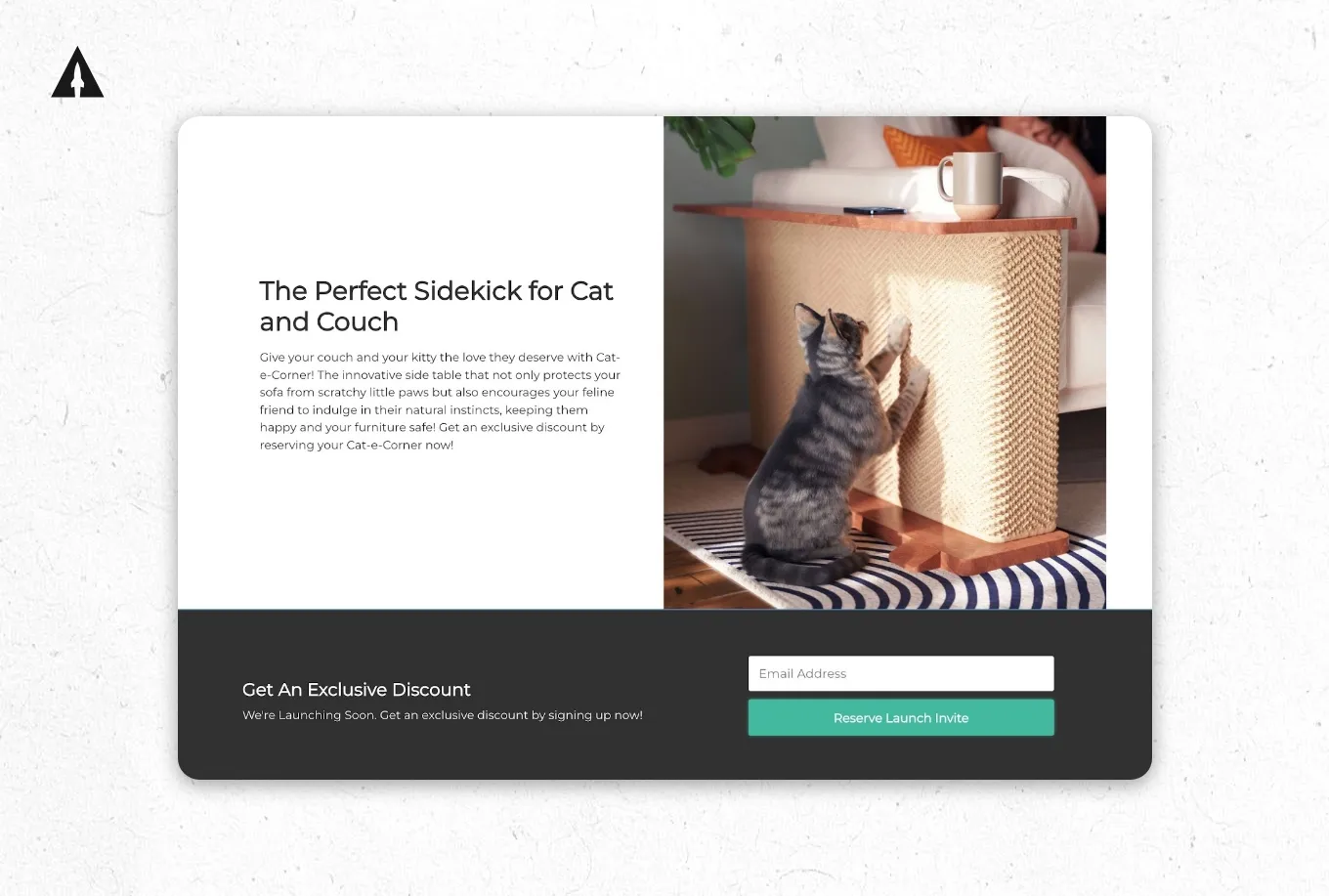
You want the headline to be attention-grabbing and descriptive. And don’t be afraid to be bold here with your language.
For Cat-e-Corner, they went with “The Perfect Sidekick for Cat and Couch.” And this headline states how Cat-e-Corner is different. Plus, it’s bold. It’s not just a sidekick for cats and couches. It’s the perfect sidekick, which packs a lot more punch.
Now, the supporting copy should expand on the headline. For example, here’s what Jeremy wrote: “Give your couch and your kitty the love they deserve with Cat-e-Corner, the innovative side table that not only protects your sofa from scratchy little paws, but also encourages your feline friend to indulge in their natural instincts, keeping them happy and your furniture safe.” This really drives home the main benefit of the product and hooks visitors to want to keep reading.
Step 3: Write Clear Headlines
Headlines are super important to get right since most visitors just skim your landing page. So they won’t read much more than the headlines anyways. Here’s where you’ll take the topics from your outline and turn them into clear headlines that are easy to read and understand.
For example, Jeremy took the outline and wrote out four different headlines for four different sections on the page. Those headlines were: “Got a sofa, got a cat, we’ve got your solution,” “Perfect fit for any sofa,” “Keep it handy, keep it classy,” and “No matter your style, Cat-e-Corner has you covered.” These were all topics that Jeremy wanted to expand upon more on the landing page.
Step 4: Fill In the Body Content
This is where you fill in the body content, which is the text that supports each headline. I recommend keeping the body section to two sentences max. Remember, most visitors will skim your site, so keep it short.
If we look at the first section of Cat-e-Corner’s page, you can see how Jeremy supported it with the following body content: “Our Cat-e-Corner lets your feline friend scratch away to their heart’s content on its special surface, saving your beloved couch from those notorious claw marks.”
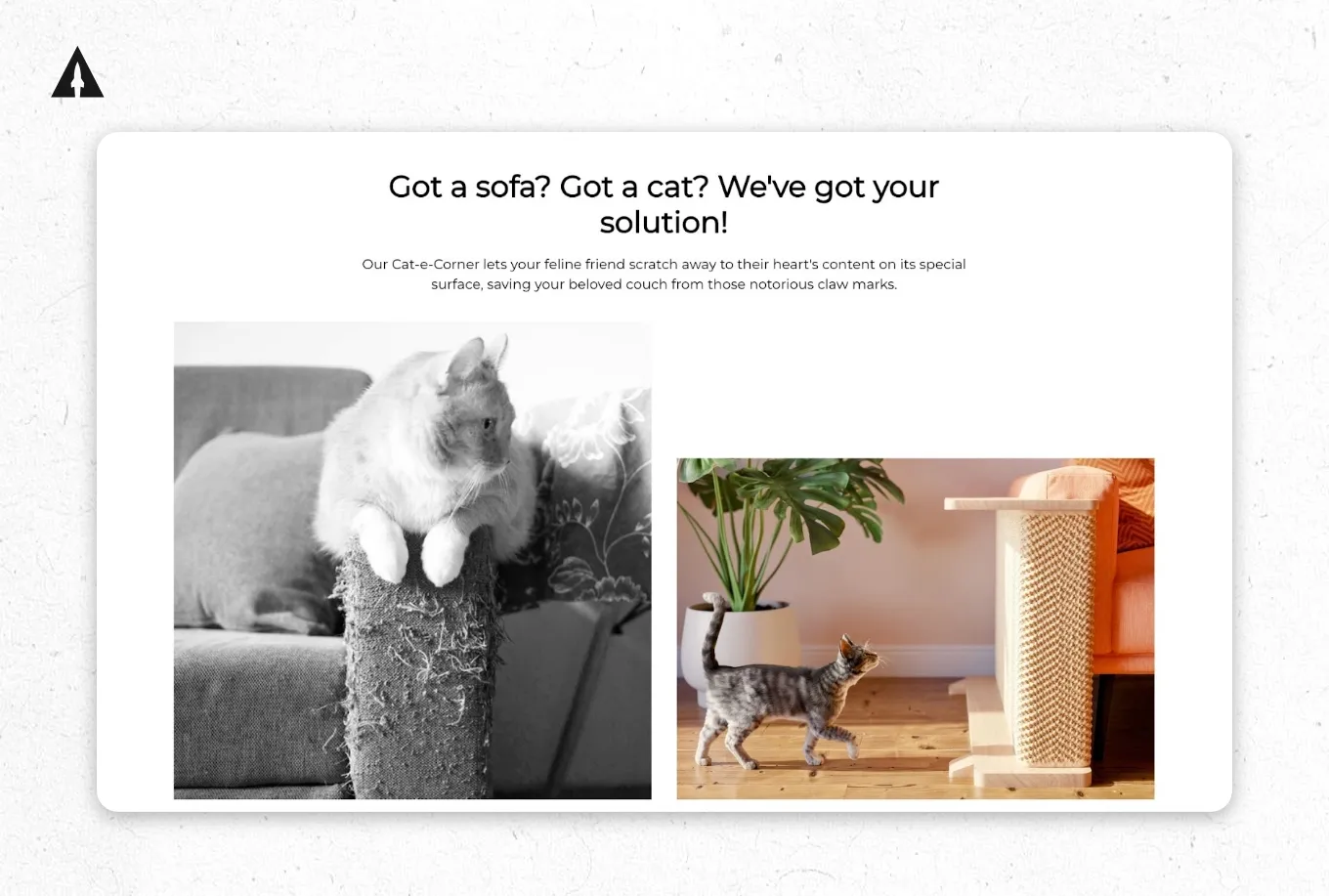
Short and to the point, while still helping the viewer get a more complete understanding of the topic that the headline brought up.
Step 5: Add Visual Assets
The best visuals for your landing page will be photos. And those photos are typically a mix of studio shots, location shots, and action shots.
Studio shots are like the glamour shots of product photography. They’re shot on a plain white or colored background, and you’ll highlight every angle and feature. Location shots highlight the places where people will use your product. And action shots showcase how people will use your product.
You’ll then take these photos and add them to your landing page. Choose photos that complement the headline and body content.
Lesson 4: Kickstarter Facebook Ads
Here’s what’s working best for our clients today: using Facebook ads to build an email list before you launch your campaign. This pre-launch strategy is incredibly powerful because it allows you to build momentum before your campaign even goes live. Then, when you launch, you have a list of warm leads ready to back your project on day one.
The Pre-Launch Strategy
The basic strategy is simple. You run Facebook ads that drive traffic to a landing page where people can sign up to be notified when your campaign launches. This landing page should clearly communicate what your product is, why it’s special, and when you’re planning to launch.
You want to collect email addresses from people who are genuinely interested in your product. These are your potential backers. And when you launch, you email this list and drive them to your Kickstarter page.
Why This Works
This strategy works for a few reasons. First, Kickstarter’s algorithm favors campaigns that get strong early momentum. When you have a list of engaged people ready to back your project on day one, you create that momentum. This helps your campaign rank higher in Kickstarter’s discovery features, which brings in more organic backers.
Second, it allows you to validate demand before you fully commit to your campaign. If people aren’t signing up for your email list, that’s a signal that your positioning or product might need work. Better to find that out during pre-launch than after you’ve launched.
Third, it gives you practice with your advertising and messaging. You can test different ad creative, different value propositions, and different target audiences to see what resonates best.
Setting Up Your Facebook Ads
To set up your Facebook ads, you’ll want to install the Meta Pixel on your landing page. This allows you to track conversions and build retargeting audiences. Kickstarter makes this easy by letting you add your pixel ID directly in the campaign dashboard.
Your ads should focus on the core benefit of your product and create curiosity about your upcoming launch. Use high-quality product images or short video clips to grab attention in the feed.
Lesson 5: Kickstarter Campaign Video
Your Kickstarter video production is one of the most important assets for your Kickstarter. Campaigns with videos simply perform better than those without. Your video needs to quickly communicate what your product is, why it’s special, and why someone should back it.
Video Length
Keep your campaign video between 1 to 3 minutes. You want it long enough to cover the key points but short enough that people will actually watch it all the way through.
Video Structure
Start with a hook that grabs attention in the first few seconds. This could be a striking visual of your product, a compelling problem statement, or an interesting fact.
Then move into clearly explaining what your product is. Remember, keep it simple. Use language your target audience understands.
Next, demonstrate your product in action. Show it being used. Highlight its key features and benefits. This is where your location and action photos come in handy.
Address potential doubts by including social proof, testimonials, or technical validation. If your product was created by an expert or has scientific backing, mention that.
Finally, end with a clear call to action. Tell people exactly what you want them to do: back your project.
Video Quality
Your video doesn’t need Hollywood production value, but it should be professionally presented. Good lighting, clear audio, and stable footage are essential. If you’re not comfortable shooting video yourself, consider hiring a freelance videographer.
The content of your video matters more than fancy effects. Focus on clearly communicating your message and showing your product in the best light.
Lesson 6: Kickstarter Costs & Budgeting
One of the most common questions I get is: “How much does a Kickstarter campaign cost?” And the answer is, it depends on your product and your goals. But I can give you some general guidelines.
Product Development Costs
Before you can launch, you need a working prototype. The cost of developing your prototype varies wildly depending on your product category. A simple accessory might cost a few hundred dollars to prototype, while a complex electronics product could cost tens of thousands.
You’ll also need product photography and potentially renderings. Budget a few hundred to a few thousand dollars for professional product shots.
Marketing Costs
If you’re running the pre-launch Facebook ads strategy I mentioned earlier, you’ll need a marketing budget. A good starting point is around $5,000 to $10,000 for your pre-launch ads. This allows you to test different audiences and build a meaningful email list.
You’ll also want to create a landing page for collecting email signups. This could be a simple page you build yourself or something more polished from a designer, typically costing a few hundred to a few thousand dollars.
Campaign Video Costs
Your campaign video is another expense. If you’re hiring a student or freelance videographer and editor, expect to pay $2,000 to $5,000. A professional agency runs $5,000 to $15,000, depending on complexity and location.
Total Campaign Costs
All told, you should budget somewhere between $5,000 to $20,000 for a well-executed Kickstarter campaign. This includes prototype development, photography, video production, landing page, and initial marketing spend.
Now, this might sound like a lot. But remember, you’re building a real business here. These are legitimate business expenses that help you validate your product and acquire your first customers.
Lesson 7: Kickstarter Fees
Now let’s talk about Kickstarter’s fees. They’re actually pretty straightforward. Kickstarter charges a 5% platform fee on funds raised. So if you raise $100,000, Kickstarter takes $5,000.
This fee is only charged if your campaign successfully reaches its funding goal. If your campaign doesn’t hit its goal, you don’t pay Kickstarter anything.
Payment Processing Fees
On top of Kickstarter’s 5% fee, you’ll also pay payment processing fees. These are charged by Stripe, which is Kickstarter’s payment processor. Payment processing fees are 3% plus $0.30 per pledge in the US, which works out to between 3% and 5% depending on your country and pledge sizes.
So in total, you’re looking at around 8% to 10% in combined fees. If you raise $100,000, expect to pay around $8,000 to $10,000 in fees.
Why These Fees Are Worth It
These fees might seem high, but Kickstarter provides tremendous value. You get access to millions of potential backers who are actively looking for new products to support. You get a proven platform that handles all the payment processing and backer management. And you get the credibility that comes with launching on a trusted platform.
Most importantly, you get to validate your product and build your customer base before investing in large-scale production. That’s worth the fees.
Lesson 8: Kickstarter vs Indiegogo
I highly recommend either watching that video or reading this article for a complete breakdown of Indiegogo vs. Kickstarter.
From a high level though, for most product creators, I recommend Kickstarter. It has a stronger brand and more organic traffic. The higher traffic means more potential for organic discovery. That said, Indiegogo can be a good choice for certain types of products or if you’ve already built a strong audience and want the flexibility of having some additional features exclusive to them.
The most important thing is to choose one platform and execute your campaign well. Don’t try to launch on multiple platforms simultaneously. Focus your energy on one great campaign.
Lesson 9: Starting a Kickstarter
Alright, let’s walk through the actual process of setting up your Kickstarter campaign.
Creating Your Project
First, you’ll need to create a Kickstarter account if you don’t have one already. Then you’ll click “Start a project” and choose your category. Pick the category that best fits your product. This helps Kickstarter show your campaign to the right audience.
Project Basics
You’ll need to fill in your project title, subtitle, and set your funding goal. Your funding goal should be the minimum amount you need to fulfill your campaign. Don’t set it artificially high. You want to hit your goal and create momentum.
You’ll also set your campaign duration. Most campaigns run for 30 days, though you can choose anywhere from 1 to 60 days. I generally recommend sticking with 30 days.
Building Your Campaign Page
This is where you’ll create your campaign story using the page editor. You can add text, images, videos, and graphics to tell your product story. Take your time here and refer back to the CBBE framework to make sure you’re hitting all the key positioning points.
Setting Up Rewards
You’ll create your reward tiers in the rewards section. Each reward needs a title, pledge amount, description, estimated delivery date, and available quantity (if you want to limit it).
Think through your reward structure carefully. Your early bird tier should offer a meaningful discount to incentivize early backers. Your standard tier should be your main offer. And you can add premium bundles or add-ons for higher-spending backers.
Profile and Collaborators
Set up your creator profile with a photo and bio. This helps backers understand who you are and builds trust. If you’re working with collaborators on your project, you can add them and set their permissions.
Payment Setup
You’ll need to verify your identity and connect a bank account through Stripe. This is where Kickstarter will send your funds when your campaign successfully completes. You’ll also need to add a payment source like a credit card for the rare case of chargebacks.
Adding Tracking
Set up your Google Analytics and Meta Pixel in the promotion tab. This allows you to track your campaign performance and build retargeting audiences for your ads. Kickstarter makes this easy by providing fields where you can paste your tracking IDs.
Submitting for Review
Once you’ve completed all the sections, you’ll submit your project for review. Kickstarter’s team will look over your campaign to make sure it abides by their rules and guidelines. They say this can take up to 3 business days (plus up to 3 more for each round of requested changes), but I’d recommend giving yourself at least a week before your planned launch date just to be safe.
Launching Your Pre-Launch Page
After your project is approved, you can launch a pre-launch page. This allows people to follow your campaign and get notified when you launch. I highly recommend doing this, especially if you’re running pre-launch ads to build your email list.
Going Live
When you’re ready to launch, you’ll click the launch button and your campaign goes live. Make sure you’re ready with your email list and initial marketing push to create that crucial day-one momentum.
That’s it. You just went through the nine fundamental lessons of Kickstarter and probably know more than 99% of people on the planet about how to launch a successful campaign. Now go out there and make it happen.
Final Thoughts
Use this Kickstarter course as your guidebook to launch a successful Kickstarter this year. Since it’s so much info I recommend you bookmark this page, like the videos and subscribe to our YouTube channel. That way you can easily come back to it whenever you want.
Also, if you want a little extra help with your launch, we’re always here to chat. Just click here to chat with one of my team members. We’ll jump on a call and talk through how we can help you with your Kickstarter launch.
Kickstarter Course: Frequently Asked Questions
How do I launch a Kickstarter campaign successfully?
A successful Kickstarter launch happens in two distinct phases: pre-launch and campaign. During pre-launch, you’ll build an email list of interested people, validate your product concept, and create all your campaign assets. I’d recommend spending at least 2-3 months on this phase. It’s where most successful campaigns separate themselves from the ones that struggle.
Then during your 30-day campaign, you’ll focus on converting that email list, running targeted ads, and maintaining momentum through regular updates and stretch goals.
What’s the best crowdfunding course for product creators?
The best crowdfunding course gives you both strategy and tactical execution, not just one or the other. This guide walks you through our proven framework for launching products on Kickstarter, covering everything from audience building to conversion optimization to post-campaign fulfillment. What makes this different from other crowdfunding courses is that it’s based on real data from 1,000+ campaigns we’ve run at LaunchBoom. These aren’t theoretical best practices. They’re strategies we’ve tested repeatedly with real money on the line.
What Kickstarter marketing strategy actually works today?
The marketing strategy that works best combines pre-launch audience building with targeted paid advertising during your campaign. Here’s the basic framework: build an email list of thousands of superfans before you launch, convert 5-10% of that list on day one, then use Facebook ads to reach new backers throughout your campaign.
Most creators make the mistake of focusing only on organic social media or only on paid ads. But the campaigns that crush their goals use both. Your email list gives you momentum on day one, and paid ads help you sustain that momentum for the full 30 days.
What are the most important successful Kickstarter campaign tips?
The three things that matter most are:
- Strong product positioning
- A large pre-launch email list
- A well-designed campaign page
If I had to prioritize, I’d say focus on your pre-launch list first. Your goal should be to hit your funding goal on the first day and the pre-launch email list will help you do this, boosting you in the rankings on Kickstarter and making your campaign look more attractive to future prospective backers.
